Murble is also available for Android on Google Play, with local transcription and AI. Steps, screenshots and Apple integrations in this guide describe the iOS edition. For Android sync and diagnostics, see the Android privacy policy and support.
Two engines, one rule
Murble can write a summary two ways, and the rule that governs both is the same: the text never leaves the phone to get written.
- Apple Intelligence. On an eligible device, Murble uses Apple's on device model. Nothing to download, and it is the fastest path.
- A local model you download. On other supported devices, you install a compact language model inside the app. It then runs entirely on the phone, including with no connection.
If neither is available, Murble tells you why and offers the download. It does not fall back to a crude word frequency trick and present the result as a summary, because a summary you cannot trust is worse than none.
From recording to minutes, step by step
-
Make sure a summary engine is available
On a device with Apple Intelligence there is nothing to do. Otherwise open Settings → Offline AI summaries and download a model. Murble recommends the largest one your device can comfortably run, and marks anything too large for the available memory as unavailable rather than letting you install something that will crawl.
-
Record or import the note
Record in the app, or import an audio file you already have. Transcription happens first, on the device, because the summary is written from the transcript rather than from the audio.
-
Read the summary
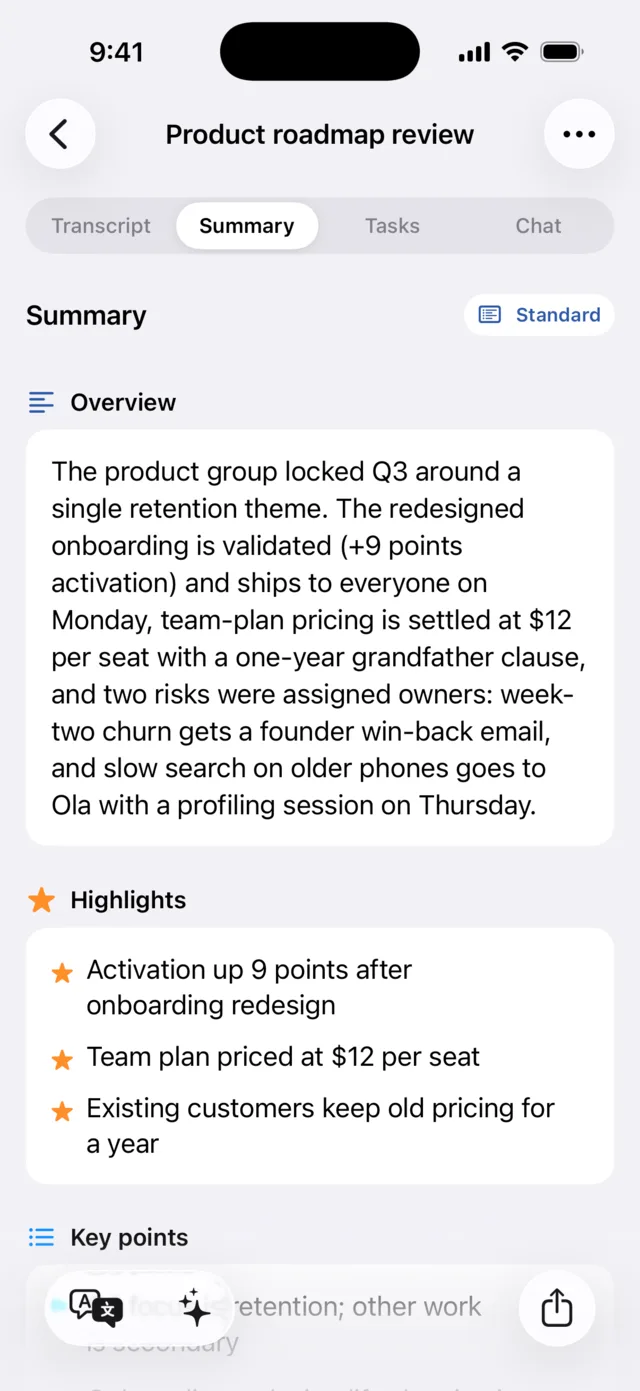
Murble writes an overview, stars the highlights and lists the key points. Four styles are available: brief, standard, detailed and action plan. You can also have the summary written in a language other than the one spoken in the recording.
Summaries are free, for every note, with no monthly allowance.
-
Work the action items
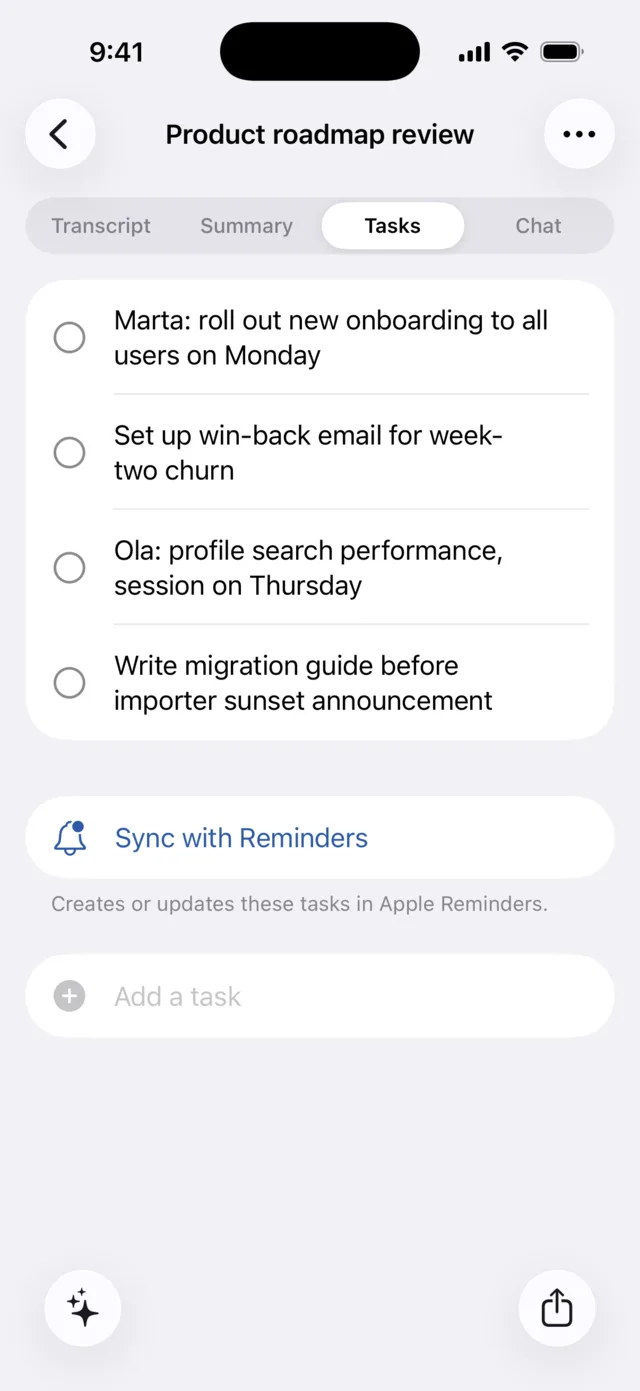
Sentences like "Marta will send the mockups on Friday" become checkable to-dos without any tagging on your part. Check them off in the app, or add your own. Sending the list to Apple Reminders, with completion syncing both ways, is a Pro extra PRO.
-
Generate a report when you need minutes
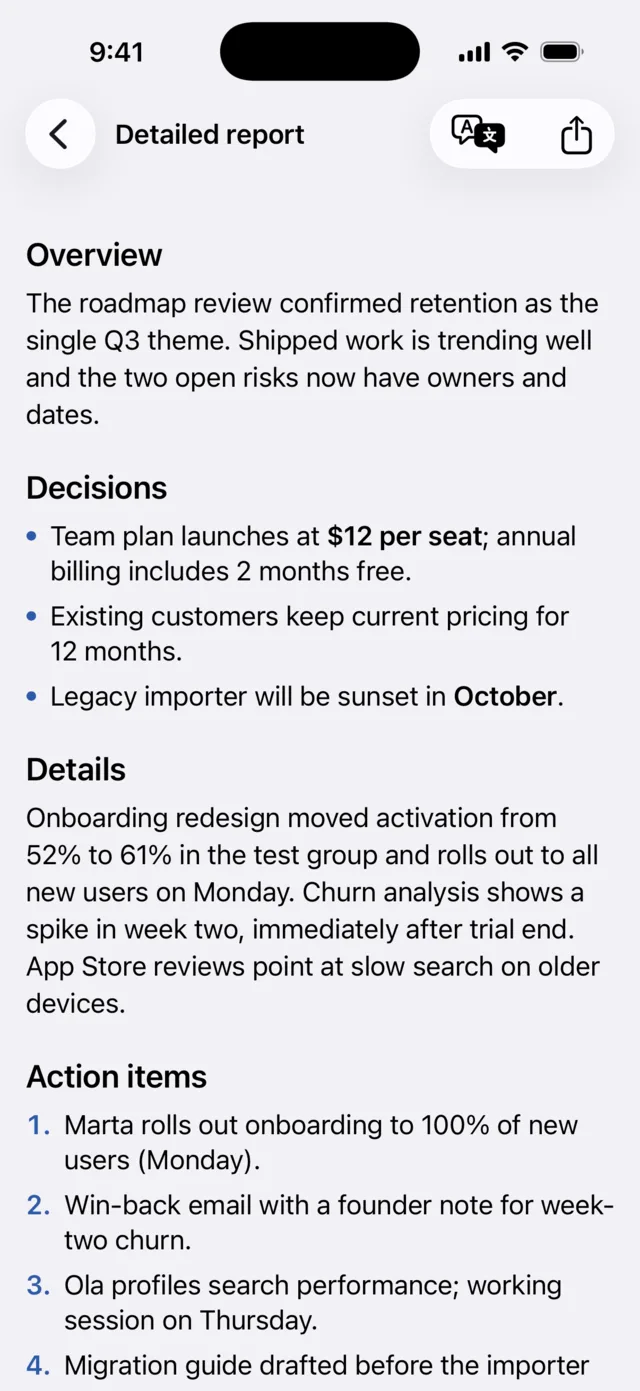
A report PRO turns the note into a structured write up: overview, decisions, details, action items and next steps. Export it as PDF, Markdown, RTF and more, or regenerate it later as the note changes. You can also ask the note questions in the chat tab PRO, and get answers grounded in what was actually said.
Which local model your device can run
Language models trade size for quality, and a phone has a memory budget the app must respect. Murble ships four sizes and works out which ones fit your device before offering them.
| Model | Size | What the app says |
|---|---|---|
| Nano | about 400 MB | Smallest and fastest, runs on any supported device |
| Compact | about 1.1 GB | Fast, with solid quality |
| Balanced | about 1.9 GB | Sharper results, needs more memory |
| Maximum | about 2.4 GB | Best quality, slowest, high memory devices only |
Automatic selection stops at Balanced. Maximum is a deliberate opt in for people who want the best result and accept the wait. A model too large for the device is shown as unavailable with a suggestion to pick a smaller one.
What is free and what is Pro
| Capability | Tier |
|---|---|
| Recording and transcription | FREE |
| AI summaries in four styles | FREE |
| Action item detection and the tasks list | FREE |
| Search, folders, categories and export | FREE |
| Apple Reminders sync | PRO |
| Chat with your notes | PRO |
| Detailed reports | PRO |
| Translations, including live while recording | PRO |
| Private iCloud sync | PRO |
Pro is $2.99 a month, $19.99 a year or $59.99 once. If Pro lapses, your notes, transcripts, summaries and local tasks stay readable; only the five extras switch off. Full detail on the pricing section.
Honest limitations
- A model is required, and it is a real download. Without Apple Intelligence you need a local model, from about 400 MB to about 2.4 GB. Murble will say so plainly and offer the download rather than producing something that looks like a summary but is not one.
- Your device decides the ceiling. On a phone with less memory, the larger models are simply unavailable. The smallest model writes shorter, blunter summaries than the largest, and that gap is real.
- Generation pauses when you leave the app. The system reclaims the GPU as soon as Murble goes to the background, so a summary in progress parks at its last checkpoint and resumes when you come back. It does not fail, but it does not finish while you are elsewhere either.
- Speed is your phone's speed. A long meeting summarized by the largest local model takes noticeably longer than a server would, and the device warms up.
- Models get things wrong. A summary can miss a decision or overstate one, and a detected action item can be a sentence that only sounded like a commitment. Treat the output as a first draft over a transcript you can check line by line, not as a record of what was said.
- Five features are paid. Reminders sync, chat, reports, translations and iCloud sync are Pro. Summaries and action items are not, and are not capped.
- Storage adds up. A speech model, a summary model, the audio and the transcripts all live on the phone.
Sources
- Model names, sizes and availability rules: the app's Settings → Offline AI summaries screen in the current build
- Free and Pro boundaries: pricing on the landing page and the app's paywall
- Offline behaviour and device requirements: landing page FAQ
- Setting up offline speech recognition first: offline transcription on iPhone
AI notes that stay on your phone
Summaries and action items are free with no caps. Pro adds Reminders sync, chat, reports, translations and private iCloud sync.
Download on the App StoreMore detail on the Murble landing page.